
August 1st, 2025
Goals!
One of our most powerful Routines is now live. Are you managing goals in a clunky spreadsheet or project tracker? Are you constantly bugging your team to add their updates? Windmill's Goals Routine is the best way to keep track of your team's progress.
Upload your team's goals to Windmill and Windy will check in with the team every week for their updates. As a team member, you no longer need to log your updates manually in a tracker. As a manager, Windy will organize all of the updates into an easy to read report that will be sent to you on whatever cadence you prefer.
Include "requester" in your Windy Routines
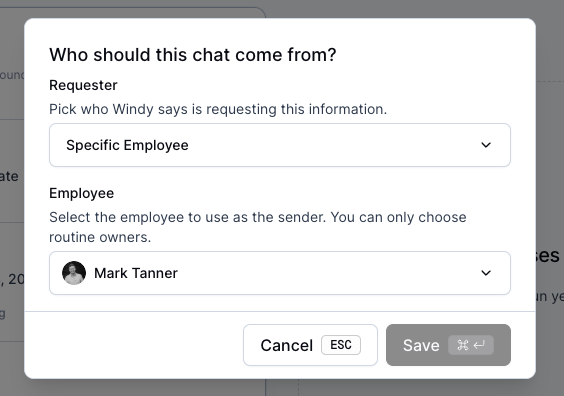
When setting up a Routine, you may want include the requesters name or in some cases, include someone else's name. I'll give you an example:
If I am collecting Goals from my team, I may want Windy to say "Mark wants to know how you're tracking on your goal?"
If I am helping organize the team's All Hands meeting, I might want to use the CEO's name in the prompt so team member's know Max wants agenda items.
As an Admin within Windmill you now have the ability to:
Include no name
Include your own name (or someone who's account you have delegated access to)
Include the recipients Manager as the requester
All of these settings are configured within the Routine page (after the Routine is created).
Improved Report Sharing
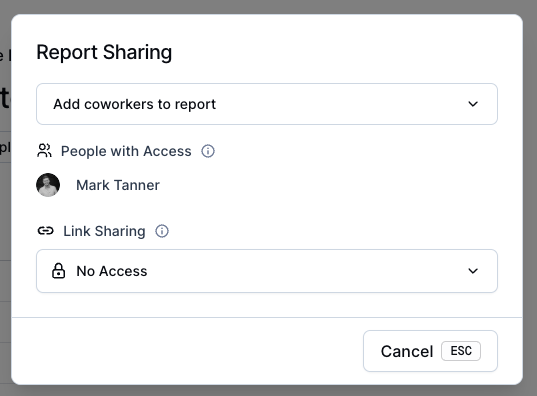
If you want to share reports with team members, we've improved that flow. Within the Report, just select "Share" on the top right and choose the setting that allows anyone with the link to access the report or to share it with people one by one.
Bug Fixes & Improvements
Improvement to chat delivery delays
Improvements to Github contributors
Fixed an issue with Stats table truncating text
Improved formatting of citations in table of contents
Bug fix for un-clearable unread icon on Reports tab
If you reply outside of a thread, Windy will teach you how to reply in a thread (gif below)